
To build the absolute best DDR2 retro gaming PC (which covers the peak era of Windows XP and early Windows 7 gaming from 2006 to 2010), you will want to target Intel’s legendary LGA 775 socket platform.
To finish off your DDR2 retro gaming PC, you need to be very smart about power supply connectivity and storage interfaces. Because you are mixing parts from different generations, pick components that act as a bridge between the 2000s and today.
The Best CPUs for a DDR2 Retro Build
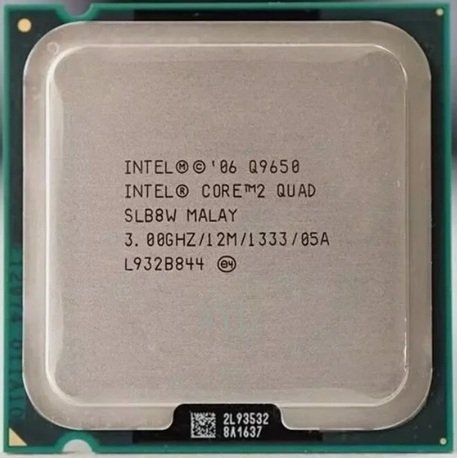
Intel Core 2 Quad Q9650: This is the absolute best, most stable consumer chip for this platform. It runs at a native 3.0 GHz with a massive 12MB L2 cache. It handles any game from the late 2000s flawlessly.
Intel Core 2 Extreme QX9650 or QX9770: If you want the ultimate periodcorrect luxury chip, the Extreme editions have an unlocked multiplier. They are highly sought after by collectors but run hotter and cost significantly more on the used market.
The Budget alternative – LGA 771 Intel Xeon X5460 / X5470: Many retro builders buy cheap server Xeon chips that have been physically modified with a sticker mod to fit into desktop LGA 775 Motherboards. They offer Q9650 level performance for a fraction of the cost, but require you to flash a custom BIOS.
The Best Motherboards
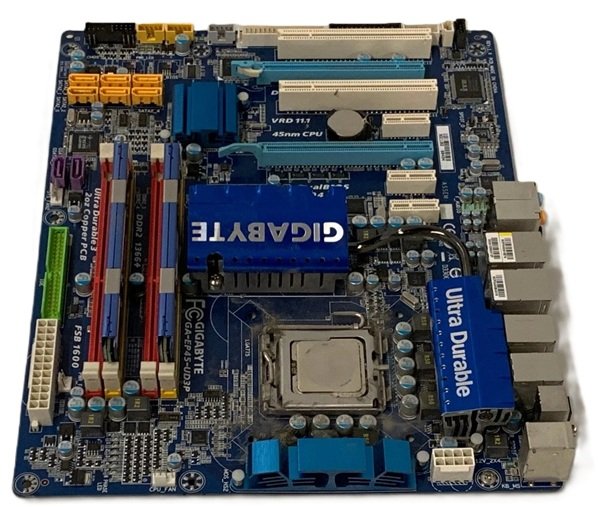
To run a high end Quad Core processor stably and get the most out of your DDR2 RAM, you need a motherboard with a premium chipset—specifically the Intel P45. Look for motherboards with 4 DDR2 DIMM slots so you can run 8GB of RAM in dual channel.
- Gigabyte GA-EP45-UD3P: Widely considered by the retro community as the holy grail of LGA 775 motherboards. It features an incredibly robust power delivery system (VRMs), heavy copper cooling tracks, and is famous for holding world-record overclocks for DDR2 memory.
- ASUS P5Q Pro / P5Q Deluxe: A spectacular, premium alternative using the P45 chipset. It offers native PCIe 2.0 support, excellent onboard audio, and a very stable BIOS that makes it highly reliable for running older Windows operating systems.
- Gigabyte GA-P35C-DS3R: A fantastic combo motherboard. The unique benefit of this board is that it features both DDR2 and DDR3 slots. It is highly prized by retro builders because it gives you flexibility if you want to swap memory types later.
Memory (RAM): 8GB (2GB x 4) DDR2 1066MHz
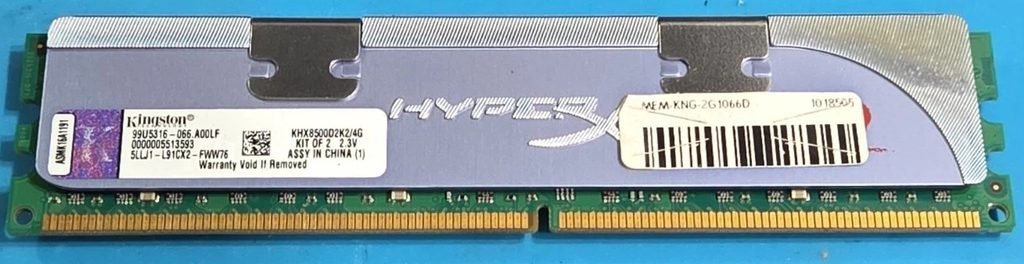
To get the absolute best performance out of your high end DDR2 retro gaming PC, the memory selection is everything. Because retro games are heavily tied to the CPU’s Front Side Bus (FSB), faster RAM speeds directly unlock higher overclocks and smoother framerates.
- The Sweet Spot: 8GB of DDR2 RAM is the maximum sweet spot for running a 64-bit version of Windows 7 or Windows 10. It provides plenty of headroom for later 2000s games like Skyrim or GTA IV.
- The Warning on 4GB Sticks: Be very careful searching for single 4GB DDR2 desktop sticks. Most cheap 4GB DDR2 modules found on online marketplaces are high density chips wired specifically for old AMD processors or are server ECC RAM (FB DIMMs). They will not work on premium Intel P35/P45 Motherboards. Stick to buying 2GB modules to fill your 4 motherboard slots.
When looking at used marketplaces like eBay, do not buy basic green value RAM. Look for high performance kits rated at 1066 MHz (PC2-8500).
The Best GPU for a DDR2 Build
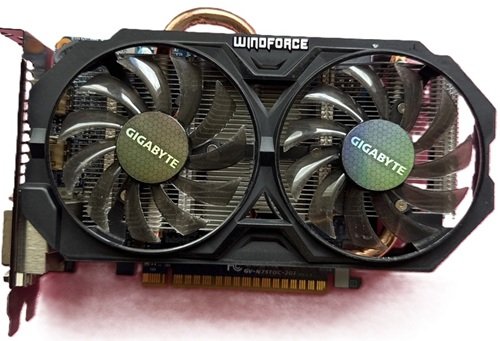
When choosing a graphics card for a DDR2 PC, your goal is to find used GPU that maximizes the weak CPU without causing an immense performance mismatch (bottleneck). You also need to ensure the card doesn’t require a massive power supply since old DDR2 prebuilts often use weak 300W power units.
Nvidia GTX 750 Ti (2GB) It is widely considered the king of low end retro upgrades. It extracts every drop of power your Core 2 Quad CPU can handle without overwhelming it. Best of all, most models do not require any external PCIe power cables—they run entirely off the motherboard slot.
The Best Power Supply (PSU)
Do not buy a used or period correct power supply from 2008. Old power supplies degrade over time, and a failing PSU can instantly fry your rare retro Motherboard and CPU. You should buy a modern, reliable budget power supply.
Technical Requirements:
- The Wattage: 550W to 650W is the absolute sweet spot. A high end Core 2 Quad (like the Q9650) paired with a graphics card like a GTX 750 Ti will only pull about 250–300W total. However, the extra headroom ensures the PSU runs cool, quiet, and highly efficient.
- The 8-Pin CPU Connector: Premium DDR2 motherboards (like the Gigabyte GA-EP45-UD3P) require a solid 8-pin (or 4+4 pin) EPS CPU power connector to stabilize the power delivery to quad-core chips. Cheap office PSUs only have a 4-pin connector, which can cause system instability or crashes when overclocking.
- Molex Connectors: Retro PC cases, older DVD drives, and classic chassis fans rely on old school, large 4-pin Molex connectors. Make sure your modern PSU includes at least 2 or 3 of them alongside modern SATA power cables.
PSU Recommendations:

- Low Noise Fan
- DC-DC Circuit Design
- Active PFC design
The Best Storage

You should absolutely install a modern 2.5-inch SATA Solid State Drive (SSD). Even though your DDR2 motherboard only supports older SATA II (3Gbps) speeds instead of modern SATA III (6Gbps) speeds, an SSD will still run significantly faster than an old mechanical hard drive. Your boot times will drop down to seconds, and retro open world games like GTA IV or Skyrim will load instantly.
If you want the authentic, period correct look and want to hear the classic crunching sound of a hard drive reading data, you can add a 1TB Western Digital Blue (7200 RPM) Hard Drive as a secondary drive just to store your games. Use the SSD for your operating system, and the HDD for game storage!
Final Thoughts
Building a high end DDR2 PC is an incredibly rewarding passion project, provided you treat it as a dedicated retro time capsule rather than a modern competitive machine. By combining a powerhouse processor like the Intel Core 2 Quad Q9650 with a premium P45 motherboard and iconic 1066MHz RAM, you will perfectly preserve the golden era of PC gaming.